
Risk-free practice
Open a demo loaded with virtual funds and test your strategies before you put in any real money.
Practice with $50,000 in virtual funds, no deposit needed. When you're ready, trade currencies, stocks, indices and crypto from just $5, on web, mobile or PC.
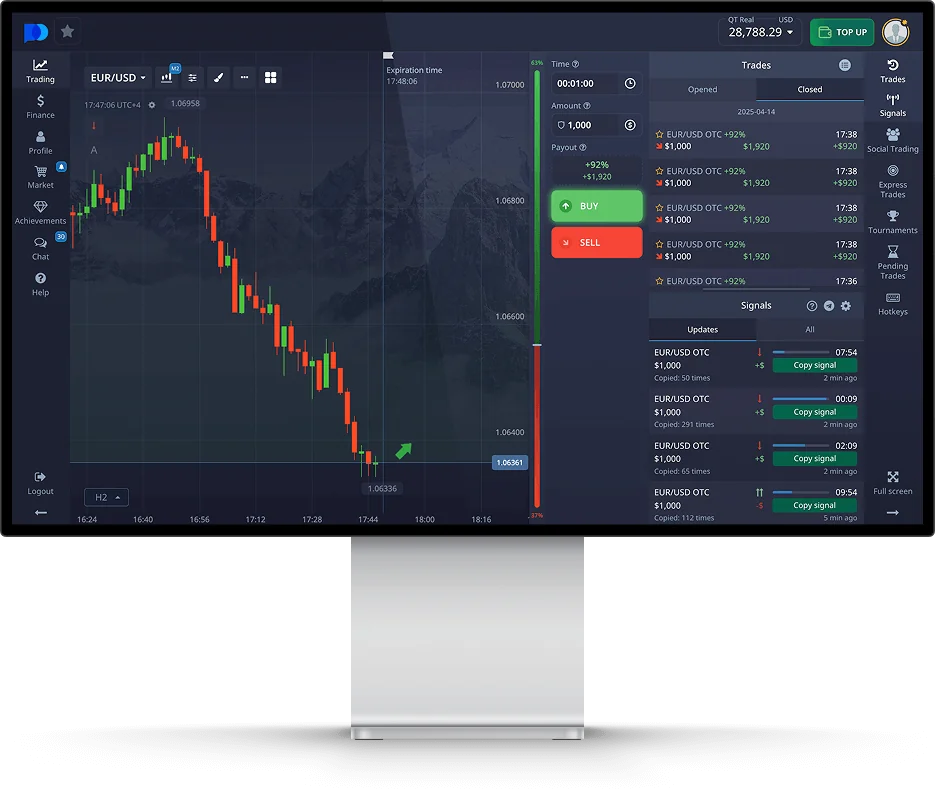
What makes the platform a popular pick for beginners and active options traders alike.
Open a demo loaded with virtual funds and test your strategies before you put in any real money.
Trade currency pairs, shares, indices, commodities and crypto from a single account.
Follow top-ranked members and mirror their positions straight from the social feed.
Dozens of indicators, plus Fibonacci and trend tools, sit right on top of the chart.
An optional AI mode opens trades for you based on technical analysis and signals.
Top up and cash out with cards, e-wallets, local methods and cryptocurrencies.
Compete in regular tournaments against other traders on the platform.
Web, desktop and mobile stay perfectly in sync, in dozens of languages.
A quick tour of the tools and perks waiting for you on the platform.
Pocket Option is an online broker launched in 2017 that gives traders access to short-term options on financial markets. Its trading platform lets you predict whether the price of an asset will go up or down over a chosen period, from as little as 5 seconds on some assets up to 4 hours, and see the potential payout before you open a trade.
More than 100 assets are available: major and exotic currency pairs, shares of well-known companies, stock indices, commodities such as gold and oil, and cryptocurrencies. You can trade options directly in your browser, through the mobile app or on your PC, and every new user can start on a free demo account.
Over the years the broker, often nicknamed Pocket Broker by traders, has operated under several brand names and domains, including PO Trade and P.Finance. You will find the full history in the former names section below.
Nothing to install, the platform runs in any modern browser.
Trade from your phone or tablet with the same tools.
Install the web app on Windows or macOS in a few clicks.
MT4 and MT5 access for forex and CFD trading.
A Pocket Option demo is the easiest way to discover trading without risking your own money. The demo account is credited with a $50,000 virtual balance that you can refill whenever you want, and it gives you the same assets, charts, indicators and order types as a real account.
Use it to understand how options work, test a strategy on different expiry times or simply get used to the interface. When you feel ready, you can switch from the demo to a real account in one click from the top of the platform.
Open a demo accountLaunch the demo directly from the Pocket Option homepage, or create a free account with your email.
Pick a currency pair, a stock, an index, a commodity or a cryptocurrency.
Select the amount of virtual money and the duration of your option.
Predict the price direction and follow the result live on the chart.
The Pocket Option app keeps your account, balance and open trades in sync on every device.
Open the platform in Chrome or Edge and use the install icon in the address bar. The web app then opens in its own window, like a desktop program.
Install the Pocket Option app from the App Store where it is available in your region, or add the web app to your Home Screen from Safari. On Mac, install the web app from your browser.
Install the Pocket Option app from Google Play where it is available, or download the official APK file from the broker website.
Pocket Option also offers access through a Telegram bot, handy to follow your account from the messaging app.
You don't need an installer from a third-party site: on PC, Pocket Option runs as a web app, so it is always up to date and takes almost no space on your computer. Traders who prefer a classic desktop terminal can also connect through MetaTrader 4 or MetaTrader 5. Whichever version you use, you get the demo account, deposits, withdrawals and every trading tool.
Get the Pocket Option appLogging in to Pocket Option works the same way on the website, the mobile app and the PC version. Click Log In, enter your email and password or continue with Google, and you land straight on the trading platform, with your real and demo balances one click apart. If something goes wrong with your Pocket Option login, these tips cover the usual fixes.
Because the brand is popular, many lookalike websites copy the Pocket Option name. Before typing your password, check the address in your browser, bookmark the official site and never sign in from a link sent by a stranger on social networks or messaging apps.
Log in to Pocket OptionMake sure you are on the official Pocket Option domain before entering your credentials.
Turn on two-factor authentication in your profile settings for extra protection.
Use the recovery link on the login form to receive a reset email.
Completing identity verification early makes your first withdrawal smoother.
You can fund your account from $5 with more than 50 payment methods, including bank cards, e-wallets, local payment solutions and cryptocurrencies. The account runs in US dollars, and Pocket Option does not charge fees on deposits or withdrawals.
To cash out, open the Finance section and request a withdrawal. Requests are usually processed within 1 to 3 business days, and the money goes back through the method you used to deposit. Before your first withdrawal, the broker may ask you to verify your identity, so it is worth doing it early.
Open an accountFrom $5, depending on the payment method you choose.
$10 for most methods, a little more for some of them.
Usually 1 to 3 business days. Crypto and e-wallets are often the fastest.
None from Pocket Option, but your bank, wallet or a currency conversion may charge.
A promo code adds a bonus on top of your deposit. It is optional, and it comes with conditions worth knowing before you use one.
You enter the code when you make a deposit, and the bonus is added to your balance as a percentage of the amount you pay in. Codes change regularly, and each one has its own minimum deposit and conditions.
Bonus money is not cash you can take out straight away. It only becomes withdrawable once you have reached a set trading turnover, which is a multiple of the bonus amount. The bigger the bonus, the more you have to trade.
Promo codes are not the only reward. As you trade, you collect gems that can be exchanged in the platform's Market for perks such as cashback, risk-free trades or a balance bonus. If you are new to the platform, a deposit without a bonus keeps things simple: nothing to unlock before you withdraw.
Two main ways to trade options on the platform, plus forex and CFDs through MetaTrader.
You choose an asset, an amount and an expiry time, then predict whether the price will be higher or lower when the option expires. If your prediction is right, you receive the payout shown before the trade, up to 92% on standard options. If it is wrong, you lose the amount invested.
Express trades combine several predictions, on one or more assets, into a single trade. All predictions must be correct to win, which makes them riskier, but the potential payout is higher, with up to 218% advertised by Pocket Option.
Every option on Pocket Option has a fixed risk: you can never lose more than the amount you put in the trade. The payout percentage changes with the asset, the time of day and the expiry, so check it on the trading panel before each trade. Start on the demo account to learn how options behave before using real money.
Prefer to follow others? In the Social Trading tab you can pick an experienced trader and copy their trades automatically. You decide what share of each trade to copy, set a minimum and maximum amount per copied trade, and choose a stop balance that ends copying if your account drops to that level.
Regular markets close at night and at the weekend. OTC assets do not, which is why you will see them in the asset list next to the usual ones.
Prices come from the live market and each asset follows the trading hours of its market. Currency pairs, for example, stop trading at the weekend.
Marked OTC in the asset list, they can be traded around the clock, weekends included. Their prices come from the broker's own feed rather than from an exchange, so they can move differently from the real asset.
OTC trading is handy if you can only trade in the evening or at the weekend. Because the quotes are not the real market, try OTC assets on the demo account first and see how they behave before you use real money.
Everything you need to analyse a market is built into the trading platform. You can switch between four chart types, add more than 30 technical indicators such as moving averages, RSI, MACD and Bollinger Bands, and draw your own levels directly on the chart.
The Education section of the platform explains how the tools work and presents trading strategies for different chart types. No strategy removes the risk of loss, so the sensible way to use one is to test it on the demo account first, with the same charts and indicators as on a real account.
Try the tools on the demoCandles, bars, line and Heiken Ashi, with timeframes starting at 5 seconds.
Trend, momentum and volatility indicators you can combine on one chart.
Trend lines, Fibonacci levels and rectangles to mark your own zones.
Follow two to four charts side by side on the same screen.
Pocket Option has used several brand names, domains and companies since 2017. Here is what each name refers to.
| Name | Domain | What it is |
|---|---|---|
| Pocket Option / PocketOption | pocketoption.com, m.pocketoption.com | Main brand and main website of the broker since its launch. PocketOption is the joined spelling of the same name, and the m. address is the mobile version. |
| PO / PO Trade | po.trade, potrade.com, potrade.io | Short brand linked to PO Trade Ltd, used for the platform and its customer support. |
| P.Finance | p.finance | Alternative domain of the same trading platform. |
| PO Finance | po.finance | Another alternative domain of the platform. |
| Pocket Finance | pocket-finance | Name and domains used to reach the platform in some countries. |
| PO Life, PO Cash, PO Company | po.life, po.cash, po.company | Additional access domains of the same broker. |
| PO Capital | po1.capital, po2.capital | Numbered platform addresses, such as platform1.po2.capital, used as mirrors of the trading platform. |
| Pocket Link | pocket-link.co (numbered) | Numbered access links, such as pocket-link1.co, reported as entry points to the platform. |
| Pocket Broker | None | Nickname used by traders when they search for Pocket Option, not an official brand. |
The first company behind Pocket Option, registered in the Marshall Islands. At that time the broker presented itself as a member of the IFMRRC, a private body rather than a government regulator.
Companies registered in Saint Lucia and in Saint Vincent and the Grenadines, linked to the PO Trade brand. The broker has held a registration with the Mwali International Services Authority (MISA) in the Comoros, an offshore body that does not offer the protection of a top-tier regulator.
The website later named Infinite Trade LLC, registered in San Jose, Costa Rica, as its operator, and more recent checks report another Costa Rican company, FX Trading LLC.
Whatever name you know it by, PocketOption, PO Trade, P.Finance or Pocket Broker, it is the same platform, the same account and the same app. Because so many names and domains exist, scammers also create copies with similar spellings. To stay safe, use the official Pocket Option website and check the address bar every time you log in.
Our honest look at the strengths and weaknesses of the broker.

As a broker, Pocket Option is built for accessibility: a small first deposit, a demo that works in one click and an interface that beginners understand quickly. The trading platform is fast, the app runs on almost any device and the choice of payment methods is one of the widest in the options market.
The main point to weigh in this Pocket Option review is regulation. The broker operates from offshore jurisdictions, and regulators such as the FCA in the UK, CONSOB in Italy, the CNMV in Spain and the FSMA in Belgium have published warnings about it. If you decide to trade, start with the demo account, only deposit money you can afford to lose and check that the service is allowed in your country.
User ratings are split. On Google Play, the Pocket Option Android app is rated about 4.4 out of 5 from roughly 75,000 reviews. On Trustpilot, the broker scores about 1.3 out of 5 from a few hundred reviews, most of them complaints about withdrawals. Read both before you decide.
Practice options trading with virtual funds before risking real money.
Answers to the most common questions about the broker, the demo, the app and the login.
Pocket Option is an online broker launched in 2017 that offers a trading platform for binary options and other short-term options. You can trade more than 100 assets, including currency pairs, stocks, indices, commodities and cryptocurrencies, from a browser, a mobile app or a PC.
Pocket Option is an offshore broker. It is not authorized by top-tier regulators such as the FCA, CySEC or the CFTC, and several of them have published warnings about it. Its services are not offered to residents of the EEA, the United States, the United Kingdom and a few other countries. Check the rules that apply where you live before opening an account.
Go to the Pocket Option website and start the demo in one click, or create a free account with your email. The demo account comes with a $50,000 virtual balance that you can top up at any time, and it uses the same trading platform, assets and tools as the real account.
The minimum deposit on Pocket Option starts at $5, depending on the payment method you choose. More than 50 deposit methods are available, including bank cards, e-wallets, local payment solutions and cryptocurrencies.
Yes. On PC, Pocket Option runs as a web app: open the platform in Chrome or Edge on Windows, or in your browser on macOS, and install it from the address bar. It then opens in its own window like a desktop program. You can also trade through MetaTrader 4 and MetaTrader 5.
Android users can install the Pocket Option app from Google Play where it is available, or download the official APK. On iPhone and iPad, download it from the App Store where it is available in your region, or add the web app to your Home Screen from Safari.
Open the official Pocket Option website or app, click Log In and enter your email and password. You can also sign in with Google. Always check the address in your browser before typing your password, and enable two-factor authentication in your profile settings.
The same platform has been known as PocketOption, PO, PO Trade (po.trade, potrade.com), P.Finance (p.finance), PO Finance (po.finance) and Pocket Finance, and it has used other domains such as po.life, po.cash, po.company and numbered po2.capital addresses. Traders also call it Pocket Broker. The operating company changed over time, from Gembell Limited to PO Trade Ltd and later to companies registered in Costa Rica.
Pocket Broker is a nickname that many traders use when they search for Pocket Option. It is not an official brand, so be careful with websites that use this name and always check that the platform you log in to is the official one.
Pocket Option mainly offers fixed time options, where you predict whether the price of an asset will be higher or lower at expiry. It also offers Express trades, which combine several predictions in one trade, as well as forex and CFD trading through MetaTrader. Assets include currencies, stocks, indices, commodities and cryptocurrencies.
Payouts on standard options can reach up to 92 percent of the amount invested, and Pocket Option advertises payouts of up to 218 percent on Express trades. The payout depends on the asset, the expiry time and market conditions, and a losing trade means you lose the amount invested.
You request a withdrawal from the Finance section of the platform. Funds are usually sent back through the same method used for the deposit, and the broker may ask you to verify your identity before processing your first withdrawal.
Pocket Option has operated since 2017 and independent reviewers have not found proof that it is a scam. It is, however, an offshore broker that is not authorized by top-tier regulators, and authorities such as the FCA, CONSOB, CNMV and FSMA have published warnings about it. Treat it as a high-risk platform: test it on the demo, verify your account before depositing and only deposit money you can afford to lose.
The minimum withdrawal is $10 for most payment methods, and a few methods require a higher amount. Requests are usually processed within 1 to 3 business days, and cryptocurrencies and e-wallets are often the fastest methods. In some cases the broker may extend the review. Pocket Option does not charge a withdrawal fee, but your payment provider or a currency conversion may.
Yes. Alongside the regular markets, Pocket Option offers OTC versions of popular assets that can be traded 24/7, including weekends. OTC prices come from the broker's own feed rather than from the live market, so they can behave differently from the real asset.
Your profile has a level that rises as your account balance grows, from an entry level for small balances up to the top levels for large ones. Higher levels unlock extra features, and the current levels and their conditions are shown in your profile. You also earn gems on the platform that can be exchanged for perks such as cashback or risk-free trades.
Yes. Pocket Option regularly issues promo codes that add a percentage bonus to a deposit. You enter the code at the deposit step, and each code has its own minimum deposit and conditions. Codes change over time, so check the ones currently shown in your account before you deposit.
Not straight away. Bonus funds become withdrawable only after you reach the trading turnover attached to the bonus, which is a multiple of the bonus amount. Check the exact terms in your account before accepting a bonus, or deposit without a promo code if you prefer to have nothing to unlock.
The platform includes more than 30 technical indicators, among them moving averages, RSI, MACD and Bollinger Bands. You can also choose between four chart types (candles, bars, line and Heiken Ashi), use drawing tools such as trend lines and Fibonacci levels, and display up to four charts at once.
Still deciding? Try the free Pocket Option demo before you deposit anything.